This story takes us back to a real world scenario. A client of ours who we have featured before has finally accepted that sync is not backup.
Way back at the start of my IT career, before I even knew that corporate cybersecurity was a thing I had the responsibility of building a small business' computer network. We're going back 30 years... a 10Mbit network was crazy-fast, those speeds were delivered via coaxial cable unless you were made of money and the threat of data loss was always hanging over your head.
For this small business, we ended up using hard disk caddys. We had one caddy unit installed in the main server and 2 roaming hard disks.
 The system was simple. The owner kept one hard disk at home and the other lived in the main server in the office. Snapshot backups were stored to the disk in the server every night. Then on Saturday afternoon after closing up for the week, the server was turned off - the hard disk caddy removed and swapped with the hard disk that was at home the prior week - and the recently removed disk taken home. This disk swapping occurred every Saturday.
Back then the Internet was in its infancy and with dial up modems far too slow for data backups. Your only data protection was what you provided yourself. As USB hard disks became the norm the technology got easier to live with day to day, but the underlying concept stuck around for a long time.
But those days are long gone and in their place we seem to have developed a mix of significantly greater reliability - and creeping complacency. Particularly in small business it's a common pattern: you run your business using Microsoft 365 or Google Workspace. Your data is synced via iCloud Drive or Dropbox (remember them?). Everything's in the cloud, everything's backed up.... right?
In the same way schadenfreude expresses a feeling that just doesn't translate into other languages, Australian English has an expression that captures this in the way other English dialects just can't: Yeahh-Nahh.
OneDrive (M365), Drive (Workspace), iCloud Drive and Dropbox.... they're all file sync services. They're NOT backups. They may look similar but they're very different.
To understand why syncing falls short as a backup strategy, we first need to look at what it’s actually designed to do. Cloud sync services are built for one primary purpose: accessibility. They ensure that if you update a spreadsheet on your office desktop in Laverton, that exact same updated file is available on your laptop when you work from home later that evening.
Syncing works by constantly monitoring your files for changes. When it detects a modification, an addition, or a deletion, it immediately replicates that change across the cloud and all connected devices.
If that warehouse in Laverton suffers a catastrophic power surge, cooking your desktop PC - your data is safe in the cloud. Happy days. It's all backed up - right? Yeahh-Nahh.
Syncing is a brilliant tool for productivity, but its greatest strength (immediate, automated replication) is exactly what makes it a massive liability when it comes to data protection. "Immediate".
Why immediate is not-so-good
Because sync tools are designed to copy changes immediately, they cannot distinguish between a good change (like updating a stock spreadsheet) and a bad change. This blind obedience opens up your business to three distinct risks:
- Accidental Deletions: I was going to say "to err is human" but apparently even AI's get this one wrong. So let's just stick with the bumber sticker: Sh** Happens. Think on this for a moment: If an employee accidentally deletes a crucial folder containing years of client data, the sync tool immediately tells the cloud, "We are deleting this folder." The cloud deletes it, and then instructs every other connected computer in your business to delete it too. While some platforms have a rudimentary "recycle bin" for a limited number of days, this is easily bypassed or forgotten until it's too late.
- Ransomware: This is where sync becomes really dangerous to your business. Ransomware is a type of malicious software that silently infiltrates a computer and encrypts all the files, locking them away until a ransom is paid. If a device on your network gets infected, the ransomware will begin scrambling the files. The sync tool will simply see that the files have been "updated" and will immediately sync the locked, encrypted, and useless files up to the cloud, overwriting your good data.
- Malicious Insiders: It's a bit like the situation in the first bullet point, but this time it's not human (or AI) error, it's a choice, it's malicious. Think of a disgruntled employee deciding to cause harm, they could intentionally alter or delete local files. Without a proper backup, the sync service will simply follow their instructions, permanently modifying or destroying your cloud data in the process.
Whatever the situation, sync is a mirror of the real data, even if things go wrong. To stretch the anology further, for real backup you want a "snapshot" you want to look into the past to a previous state of your data. If sync is a mirror, backup is a portrait or a photo.
Draw me like one of your french girls

A genuine backup solution is designed specifically for disaster recovery and business continuity. It doesn't just replicate your current state; it captures historical states of your data and protects them from being altered.
If you're looking to backup your critical business data, there's a bit to consider. Every business doesn't require everything listed below but at a minimum you could consciously think about what you do and don't need:
- Versioning and Snapshots: A real backup takes "snapshots" of your data at regular intervals (e.g., every hour or every night). For example: if your files are hit by ransomware on a Thursday afternoon, you don't panic. You simply roll back your system to the clean snapshot taken on Thursday morning. You have a historical archive to draw from.
- Isolation and Immutability: Backups should be stored completely separately from your live working environment. To take it a step further, backups should be immutable where possible (i.e. once a backup is written, it cannot be changed, deleted, or encrypted by anyone - not even by a ransomware infection). Immutability is an example however of a strong should, simply because for some businesses the costs may not stack up.
- 3-2-1: If you take away nothing else, just take away this. The 3-2-1 strategy. At minimum, you should have three copies of your data (one live copy, two backups). These backups should be stored on two different types of media. At least one of these copies should be offsite or in an isolated environment.
My own dogfood
This isn't just say as I do.... Here's how I protect my business:
- Live data: My live data is hosted and synced on Google Drive.
- The first backup: The first snapshot of this data is taken on a nightly basis and stored to a UNAS Pro. You'll see a number of mentions of the UNAS series, this is because we have strict data encryption requirements and these devices have native support.
- The twice weekly snapshot: Twice a week, a snapshot of the first backup is taken and stored to a second UNAS Pro.
- Offline backup: In addition to the automated snapshots, a manual copy is taken on a weekly basis and stored on an encrypted drive. This encrypted drive is stored in a physical hidden safe.
- Off-site backup: Finally a third UNAS (UNAS-2 in this instance) is hosted off-site and holds a snapshot taken on a weekly basis.
Now if the above isn't mathing when contrast to the 3-2-1 strategy listed previously that's because it isn't 3-2-1. I did the risk assessments, I considered the liability of data loss, I considered what my clients expect and I came to the conclusion what I needed something more robust. My strategy is 5-3-2-1: five copies, spread across three media types with two off-network backups and one fully air-gapped copy:
- Layer 1: The Live Data (Google Drive Sync)
- Layer 2: The First Backup (Nightly NAS Snapshot)
- Layer 3: The Redundant Local Snapshot (Twice-Weekly NAS)
- Layer 4: The Offline Air-Gapped Backup (Encrypted Drive in a Safe)
- Layer 5: The Off-Site Remote Backup (Weekly Remote NAS)
How much or how little backup you have should be aligned to your business' needs, but 3-2-1 should be considered the absolute minimum.
The buddy system
So this all sounds sophisticated and expensive right? For budget conscious businesses, the up-front cost of backup is often where it falls over. It's an expense that feels easy to defer - well until it isn't. So for that reason I'd like to put forward the buddy system "I'll be your backup if you'll be mine".
If your business has multiple physical locations you can possibly skip this section altogether. Just use your existing locations as a system ti distribute your backups. If not, get a buddy.
In my own case, my buddy is one of my clients. They own a warehouse location and within that warehouse there's an office partition. Above that office partition there's a series of old store-rooms that were used by a previous tenant. My client (and buddy) however had no use for these store rooms so they just sit empty collecting dust. The last person up there I believe was their electrical contractor (not AFSecure) who used the space as an easy way to run network cables into their office partition below.
This dingy, isolated environment is where my off-site backup lives. And I host theirs. To maintain security I have configured a VPN device so only I can see my remote NAS and I've done the same so only they can see their remote NAS that I'm hosting.
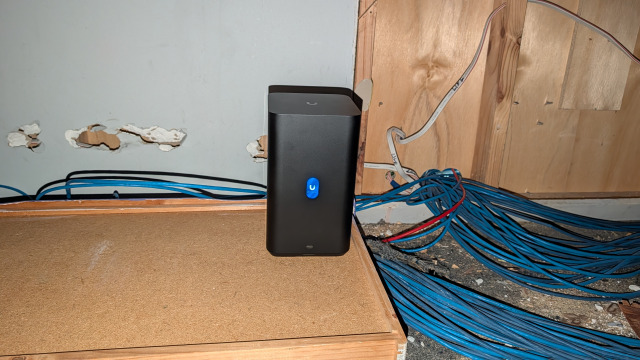
The environment isn't ideal, but a backup in a less than ideal location is still a significant upgrade from no backup at all. The space is surprisingly temperature stable (which I can also monitor remotely thanks to the choice of UNAS) and apart from the sawdust left behind by their electrical contractor it's surprisingly dust free too.
A secure buddy
Of course the caveat here is that a buddy system must still be secure. While we've used a VPN to secure the data in transit (from office to remote backup) there are a surprising number of physical security mechanisms in place:
- The off-site location is surveiled, monitored and alarmed.
- The storage space is under lock and key.
- The storage space requires a scissor lift just to access it.
- If all else fails, the remote UNAS is configred with full-disk encryption (as all our storage systems are).
Just keep in mind youre buddy needs to be a secure one. There's no point storing your business data with a buddy only to watch it go missing the next day.
When it's too late
.. it's too late.
Don't wait until "too late" comes to bite you. If you're relying on sync then go purchase a USB drive, take a snapshot and pop it in a safe. Identify who your backup buddy is, grab a coffee and discuss supporting each-other's business resilience. And if you're really stumped or perhaps you need someone who can help you with the risk assessment to untangle what's right for your business, book a free consultation with AFSecure.